lvgl_clock — a clock for ESPHome’s LVGL
A native LVGL 9 widget: add it
under lvgl: widgets: just like canvas or line. It owns its own canvas
and redraws itself — no interval: + lambda glue needed. Pick a style:
style |
preview | what it looks like |
|---|---|---|
| clockclock24 (default) | 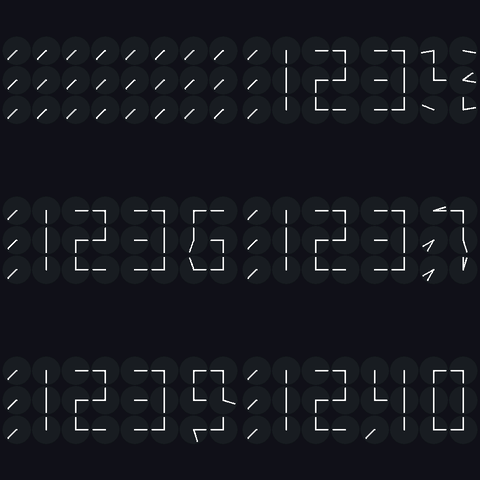 |
A digital clock built from 24 tiny analogue clocks (ClockClock 24); hands sweep to form the digits, with rotate_left / flying_birds / wave / spiral / wind / rotating_maze / zipper / mirror_wave / love idle animations, plus |
pattern for ones you author yourself. |
||
| analog | 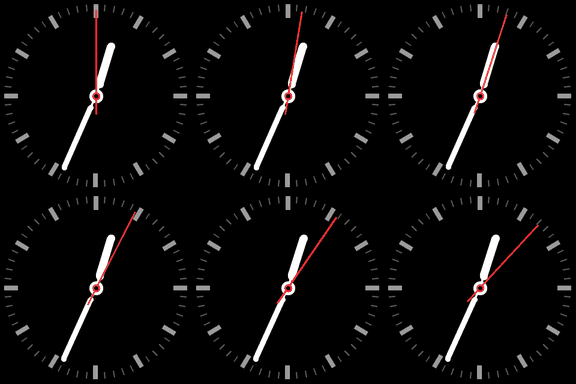 |
A classic analogue clock face — independently configurable ticks and per-hand style/colour. |
| digital | 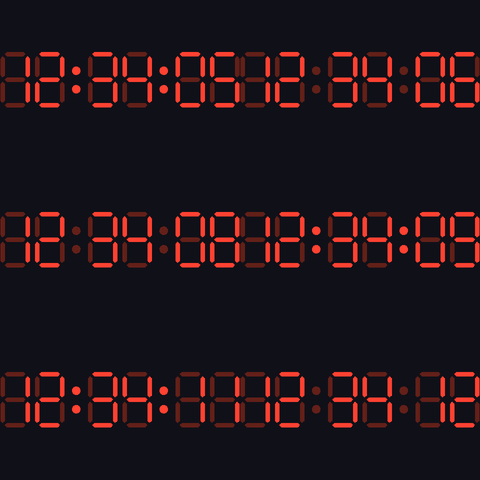 |
HH:MM(:SS) as a 7-segment display with a “ghost 8”, optional blinking colon, and an AM/PM column in 12h mode. |
| flipclock | 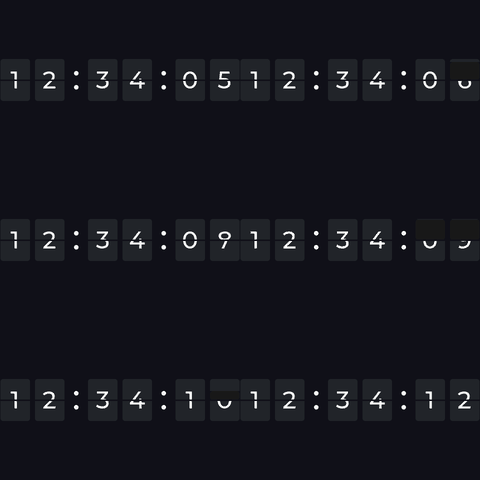 |
HH:MM(:SS) as split-flap cards with real font-rendered digits and an animated flip on every change (flipclock.js look). |
| seg_matrix | 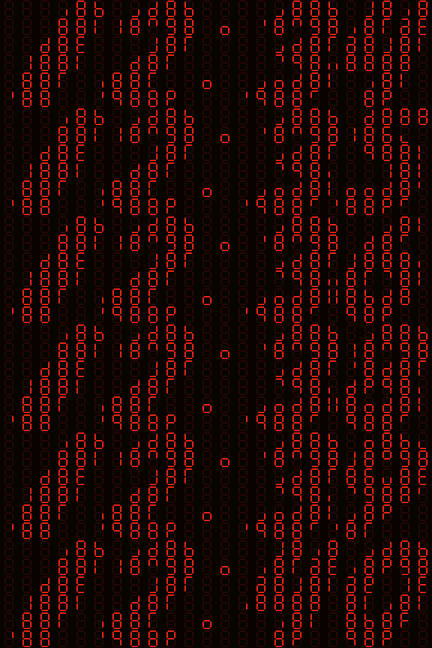 |
Big HH:MM digits drawn on a grid of small 7-segment displays — each little display’s segments act as pixels of the large numerals (a 7-segment display array). Best on a wide panel. |
Previews rendered with tools/gifgen — the real component
drawing run headless against desktop LVGL, so they’re pixel-identical to the
device.
Contents
- Usage — the minimal config
- Shared options — what every style understands
- Styles — preview, options and examples per type: clockclock24 · analog · digital · flipclock · seg_matrix
- Examples and hardware — ready-to-flash configs, the boards and panels they run on, and the shared packages that wire them up
- Resolution and PSRAM — sizing the canvas
- Building a physical ClockClock 24 from 24 displays:
partial, UART time sync, and the whole build indigital_clock_clock_24_24_round_screens/
Usage
external_components:
  - source: { type: git, url: https://github.com/tuct/esphome-lvgl-clock, ref: main }
    components: [lvgl_clock]

time:
  - platform: sntp
    id: clock_time
    timezone: "CET-1CEST,M3.5.0,M10.5.0/3"

# Marker only - enables the widget below, takes no options itself. Required
# because ESPHome only loads a component's code when its domain appears as a
# top-level YAML key.
lvgl_clock:

lvgl:
  displays: [my_display]
  widgets:
    - lvgl_clock:
        id: dc
        time_id: clock_time
        width: 150
        height: 128
        style: analog
        show_seconds: true
Position and size (x, y, width, height, align, …) are ordinary
LVGL widget properties — set them like on any other widget. width/height
are required here (used to size the canvas buffer).
The style is chosen by the style: key — clockclock24 / analog /
digital / flipclock / seg_matrix. If omitted, it’s inferred from
whichever one style sub-block (clockclock24: / analog: / …) you provide,
defaulting to clockclock24 if none are given.
Shared options
| Option | Default | Description |
|---|---|---|
time_id |
(required) | A time: component. |
width / height |
(required) | Canvas size in px. |
style |
clockclock24 |
clockclock24, analog, digital, flipclock, or seg_matrix. |
twenty_four_hour |
true |
false = 1–12. enables am/pm on digital, or flipclock. |
show_seconds |
false |
Adds :SS (digital/flipclock) or a sweeping second hand (analog). No-op for clockclock24 — the physical ClockClock 24 has no seconds display. |
render_interval |
16ms |
How often the widget redraws itself (~60 fps). |
foreground |
white | The “ink”: hands / markers / digits. |
background |
black | Behind everything. Ignored when transparent. |
transparent |
false |
Clear the canvas to fully transparent each frame instead of filling background, so other LVGL widgets placed behind the clock (listed earlier in widgets:) show through the gaps between hands/ticks/digits. Allocates an ARGB8888 canvas — 4 bytes/px instead of 2, so it needs roughly double the RAM (likely PSRAM at larger sizes). |
grayscale |
false |
Allocate the canvas as 8-bit greyscale (LV_COLOR_FORMAT_L8) instead of RGB565 — half the RAM, colours reduced to luminance. See below. Mutually exclusive with transparent. |
Before the time source first syncs, analog / digital / flipclock show a
fake 00:15 with the seconds running off uptime, so the clock looks alive
instead of showing dashes. clockclock24 instead parks its hands until the
first sync — or runs whatever idle animation you drive it with during the
wifi/NTP boot phase (see its mode actions below).
foreground and background are the only shared colours (they mean the
same thing in every style). Face-specific colours live inside the style
block that uses them — see below. All colours take the id of a color:
component and are optional; omit for white-on-black.
grayscale: half-size canvas
The canvas is normally RGB565, 2 bytes per pixel — a 240×240 face is 115 KB,
which is most of the internal RAM on a chip without PSRAM. grayscale: true
allocates it as L8 (1 byte per pixel): the same face becomes 57.6 KB.
- lvgl_clock:
    id: dc
    time_id: clock_time
    width: 240
    height: 240
    grayscale: true      # 57.6 KB instead of 115 KB
Every colour is reduced to its luminance, so the face renders in shades of grey. For the usual white-on-black clock that costs nothing; for the SBB face or a coloured second hand it obviously does.
Why not 1-bit? A 240×240 I1 canvas would be 7.2 KB, but LVGL’s I1 blend
resolves an anti-aliased pixel as mask / 255 in integer arithmetic, so every
partially covered pixel is discarded — thin lines vanish and hands render as a
few stray dots. L8 mixes with lv_color_8_8_mix() and anti-aliases correctly.
Reach for this only when RAM is the binding constraint. With PSRAM, or one display per MCU, plain RGB565 fits and is the faster path — L8 still has to be expanded to RGB565 on every flush to the panel.
Transparent background / layering other widgets
With transparent: true the clock clears its canvas to fully transparent each
frame instead of filling background, so any LVGL widget placed behind it
(listed earlier in the widgets: list — earlier = lower z-order) shows
through the gaps between the hands/ticks/digits. This is how you put e.g. a
date label, an image, or a coloured backdrop behind the clock. For example, a
date drawn with a plain label (nothing to do with this component) behind a
transparent analog face:
lvgl:
  widgets:
    - label:                 # drawn first => behind the clock
        id: date_label
        align: CENTER
        y: 70
        text_font: montserrat_24
        text: ""
    - lvgl_clock:
        id: dc
        time_id: clock_time
        width: 320
        height: 320
        style: analog
        transparent: true    # face is see-through; the label shows through

# update the label from the time component (the clock never renders a date)
interval:
  - interval: 30s
    then:
      - lvgl.label.update:
          id: date_label
          text: !lambda 'return id(clock_time).now().strftime("%a %d.%m");'
A full version is in example_analog.yaml.
Cost: transparency needs an alpha channel, so the canvas is allocated as ARGB8888 — 4 bytes/px instead of RGB565’s 2, i.e. roughly double the RAM (e.g. 320×320 ≈ 410 KB). On a non-PSRAM ESP32 that allocation may fail; the widget logs an error and disables itself (blank clock) rather than crashing — shrink the canvas or add PSRAM.
style: clockclock24
clockclock24:
  hand_width: 1             # base hand thickness (px)
  movement: opposite        # opposite | clockwise | counter | long
  transition_length: 2s      # sweep duration on a time change
  mode: time                 # time | rotate_left | flying_birds | wave | spiral
                             #      | wind | rotating_maze | zipper | mirror_wave | love | temp
                             #      | pattern | demo
  mode_speed: 1.0             # idle-animation speed multiplier (idle animations only)
  cycle_modes: ...           # break out into a random choreography - see below
  spacing: 0.0                # gap between HH and MM, in clock-widths
  demo_interval: 5s           # `mode: demo` only - see below
  demo_step: 1                 # `mode: demo` only - fake minutes per tick
  partial: 7                    # draw ONLY this one of the 24 - see below
  startup_align: 0s           # hold every hand at 12 for this long after boot
  sync_dot: false             # blink a dot while OUT OF SYNC - see below
  padding_inside: 0           # px gutter between neighbouring mini-clocks
  padding_outside: 0          # px margin around the whole block
  show_face: false            # draw a filled disc behind each mini-clock's hands
  face_color: ...             # little-clock fill (needs show_face)
  border_color: ...           # little-clock rim (needs show_face)
startup_align and sync_dot exist for multi-display builds and are worth
knowing before you wire 24 panels:
startup_alignholds every hand at 12 o’clock for the first N seconds after boot. On a wall it is the quickest check that each panel is alive and mounted the right way up — any module whose “up” isn’t up is obvious at a glance — and the first real sweep then starts from the same place on every node. The hands sweep to 12 rather than snapping there.sync_dotblinks a dot at 1:30 for 120 ms every second, only while the node is out of sync. It is a fault light, not a heartbeat: a healthy wall shows nothing, and any panel still blinking has not heard a usable time from the master. Anything not fed by the UART time platform — a master, or any standalone clock — counts as synced and never shows it.
Examples: example_clockclock24.yaml,
example_clockclock24_demo.yaml.
Each mini-clock has two hands, and movement controls which direction each
takes to reach its new target angle:
opposite(default) — the two hands travel in opposite directions from each other (one clockwise, one counter-clockwise) — the classic ClockClock 24 look, hands seeming to open/close like scissors.clockwise— both hands always travel clockwise.counter— both hands always travel counter-clockwise.long— each hand independently takes whichever direction is the longer way around, for a more dramatic full sweep.
Idle animations (choreographies)
Six of them, each a pure function of the shared wall clock and the mini-clock’s position in the 8×3 grid — so on a multi-display build every node draws its own slice of one figure, with no coordination beyond the synced time.
| Mode | Action | What it looks like |
|---|---|---|
rotate_left |
lvgl_clock.rotate_left |
Every hand sweeping counter-clockwise in unison |
flying_birds |
lvgl_clock.flying_birds |
Hands opening and closing like wings, all together |
wave |
lvgl_clock.wave |
Every clock is one stroke. All start together on the 10:30–4:30 diagonal, the left column sets off first and the start ripples right, then all turn clockwise at the same constant rate — each column held a fixed 15° behind its left neighbour, so the wall fans from near-vertical to past-horizontal and nothing overtakes |
spiral |
lvgl_clock.spiral |
Both hands together on 7:30. All start from that pose, the start rolls out diagonally from bottom-left to top-right, then every clock turns counter-clockwise at a constant rate with the offsets it picked up |
wind |
lvgl_clock.wind |
Each wall column is one continuous stalk — leaning in top-left, vertical through the middle, out bottom-right. A gust from the left shears the two free ends past each other (top 10:30→1:30, bottom 4:30→7:30) while the middle row stays put, and rolls across the wall |
rotating_maze |
lvgl_clock.rotating_maze |
A chevron per clock, alternating by column, the pair turning as a rigid body — clockwise on rows 0 and 2, counter-clockwise on row 1. The rate is not constant: it eases to 40% of pace each time the wall lands on an aligned figure, so the lattice reads as forming and dissolving rather than spinning |
zipper |
lvgl_clock.zipper |
The wall rests as one field of \ diagonals; a front runs across it left to right, unzipping each column into a pair of mirrored chevrons (> <) and doing it up behind. Between passes a resting column leans slowly and back, so the field is never quite frozen |
mirror_wave |
lvgl_clock.mirror_wave |
Every clock rests as one vertical stroke and scissors open, mirrored about the wall’s centre line — the left half opens right, the right half left, and the middle row the other way from the two around it. Starts at the middle columns and spreads outwards; the top and bottom rows run at 75% of the middle’s rate, so the three rows beat against each other on a 36 s cycle |
pattern |
lvgl_clock.pattern |
Plays a motion pattern — 24 per-clock poses and speeds authored in tools/clockclock24-sim rather than written in C++. Which one is the pattern slot, which travels in the sync packet; a slot that has not arrived yet draws the time instead |
love |
lvgl_clock.love |
Spells LOVE across the four digit positions and holds it — a pose rather than an animation, swept in and out like any other mode change |
time |
lvgl_clock.show_time |
Not an animation — back to the clock |
mode_speed scales all of them. Drive them from automations — e.g. spin while
Wi-Fi connects, birds while waiting for NTP, then the time, as in
example_clockclock24.yaml.
The animations run off the synced wall clock, not millis(). That matters
on a wall: every board powers up at a different instant, so a millis()-driven
figure would be a different figure on every board.
cycle_modes: step through the choreographies
Rather than driving the animations by hand, let the clock interrupt itself:
clockclock24:
  cycle_modes:
    interval: 1min      # one window per minute
    modes: [birds, wave, spiral, wind]
Every interval, the next mode in modes plays for 35 s starting 10 s
past the top of the interval — so with 1min it runs from :10 to :45 of every
minute — then the clock returns to whatever it was showing. The :10 start
keeps the animation clear of the digit flip at :00.
The window is deliberately not configurable; only the cadence is. 35 s is
long enough for any of the choreographies to read as a whole gesture, and the
other two knobs offer nothing except ways to leave a wall permanently
animating. The window includes the fades in and out, so what you see is a
staggered left-to-right sweep into the choreography, the choreography itself,
and a staggered sweep back — all inside the window, with the clock showing the
time again by the end of it. interval therefore has a 1 min floor, since anything shorter
could not contain the window.
The list is walked in order and wraps, so a repeated entry simply comes
round more often — [wave, wind, wave, spiral] gives wave half the slots.
modes accepts any idle animation (birds is an alias for flying_birds) but
not time or demo.
The mode is picked by hashing the interval number rather than by a random draw, so it is stable and repeatable — a board that reboots mid-window rejoins the choreography already playing rather than restarting it. It needs a synced clock, so nothing fires until the time is valid.
On a multi-display wall, exactly one widget picks. The first lvgl_clock_id
listed on the broadcasting sync platform is the picker; every other widget —
the other panels on that board, and every listening node — is marked a follower,
never runs cycle_modes:, and is handed the mode over the bus. Relying on all
of them computing the same answer independently would work only for as long as
their clocks and their config agreed to the second, so the choice is made once
and sent. cycle_modes: can therefore live in the shared config; only the
master acts on it. See
Distributing the time over UART.
One consequence worth knowing: drive mode actions at the picker, not at the
followers. An automation setting lvgl_clock.show_time on a follower once a
second will fight the mode arriving over the bus, and that board’s panels will
visibly disagree mid-choreography.
While a window is open, mode-setting actions are recorded rather than obeyed,
and applied when it closes. Without that, an automation re-asserting
lvgl_clock.show_time once a second would chop the animation into pieces.
Testing the digit-flip animation — clockclock24 only re-animates on an
actual minute change, so watching it live can mean waiting up to 60 real
seconds to see a flip. mode: demo (action: lvgl_clock.demo) advances a
fake internal minute every demo_interval (default 5s) instead of reading
the real clock, so you can watch the animation repeatedly on demand. See
example_clockclock24_demo.yaml for a
config that boots straight into it.
demo_step (default 1) is how many fake minutes each tick jumps. At 1 only
the minutes digits ever change — the hours digits sit still for 5 to 50 minutes
of real time, which looks like a dead display. A stride like 137 (2 h 17 m)
changes all four digits on every tick.
partial: one mini-clock per display
partial: 0…23 draws only that one mini-clock, scaled to fill the widget,
instead of the whole 8×3 grid. It exists to build a physical ClockClock 24
out of 24 separate round displays, one MCU each.
Every node still runs the identical animation engine over all 24 clocks and
simply renders its own, so the digit sweeps, movement: directions and idle
animations stay in step across the wall by construction — the only thing the
nodes have to agree on is the time.
clockclock24:
  partial: 18       # digit 3, row 0, col 0
Clocks are numbered index = digit * 6 + cell, cell = row * 2 + col, so each
digit is a 2-wide × 3-tall block:
          digit 0      digit 1      digit 2      digit 3
        ┌──────────┬────────────┬────────────┬────────────┐
 row 0  │  0    1  │   6    7   │  12   13   │  18   19   │
 row 1  │  2    3  │   8    9   │  14   15   │  20   21   │
 row 2  │  4    5  │  10   11   │  16   17   │  22   23   │
        └──────────┴────────────┴────────────┴────────────┘
Each node logs its own position at boot:
Partial: clock 18 of 24 (digit 3, row 0, col 0).
The full build — wiring, memory budget, node configs — is in
digital_clock_clock_24_24_round_screens/.
Distributing the time over UART
For a multi-node build, time: - platform: lvgl_clock shares one clock across
all the nodes on a single wire: one node has Wi-Fi and SNTP and broadcasts,
the rest listen and set their clocks from it.
# master - the only node with a network
time:
  - platform: sntp
    id: clock_time
  - platform: lvgl_clock
    uart_id: sync_bus
    lvgl_clock_id: dc
    broadcast_interval: 1s     # presence of this key = master role

# every other node
time:
  - platform: lvgl_clock
    id: clock_time             # this is the widget's time_id
    uart_id: sync_bus
    lvgl_clock_id: [dc_a, dc_b, dc_c]   # every widget on this node
| Option | Default | Description |
|---|---|---|
uart_id |
(required) | The uart: bus. The master needs tx_pin, slaves only rx_pin. |
broadcast_interval |
(unset) | Set = master, sending this often. Unset = slave. |
lvgl_clock_id |
(unset) | One widget id or a list. The master sends its animation mode and slaves adopt it, so the whole wall spins/flies/shows time together. |
A node driving several panels must list all of them. On a slave the bus is
the only thing that sets the mode, so a widget left out sits on its boot default
forever. The first id is special: it is the node’s picker for
cycle_modes, and on the master it is
the widget whose mode goes on the wire — the rest are marked followers and are
handed it.
The wire format is one plain line, so a serial monitor is enough to debug it:
CC24 <epoch> <ms> <mode> <demo_min> <temp> <slot> <movement> <transition_ms> <speed_x100> <hand_rgb> <bg_rgb>
Both ends log mode changes by name (TX mode -> spiral, RX mode -> spiral) at
INFO, so two consoles side by side show the propagation directly.
The millisecond field matters more than it looks: nodes only need to agree on
which minute it is, but a node whose clock sits a second off flips its digit
a second late, and across a wall that reads as a fault rather than as drift.
ESPHome’s own synchronize_epoch_() ignores corrections under ±1 s and sets
whole seconds only, so this platform sets the clock itself with microsecond
precision. <demo_min> carries the master’s fake-minute counter in mode:
demo (-1 otherwise) — without it each node would count its own and every
display would show a different time.
Every field after <mode> is optional on the way in: the parser fills a
default for anything the line does not carry, and ignores anything it does not
recognise. That is what makes a mixed-firmware wall survive — an older listener
reads a newer master’s line and simply stops at the last field it knows. It is
also why the format only ever grows: fields are appended, never reordered
or repurposed, and the mode and movement enums are append-only for the same
reason.
The last five carry how the wall moves and what it is drawn in — the routing rule for a sweep, how
long a sweep takes, and the choreography speed multiplier. They are set on the
master (as Home Assistant entities) and broadcast, because they have to be the
same everywhere: mode_speed scales the time base, so two boards on different
values do not merely look different, they drift apart.
Three details that only matter once there is more than one node, but matter a lot then:
<epoch> 0means “mode only, keep your clock”. The master broadcasts from boot, before SNTP has given it a time, so the whole wall shares its boot animation instead of one node spinning while the rest sit on their defaults. It is also what letsmode: demodrive a wall with no network at all.- A mode change is sent immediately, not at the next
broadcast_interval. Waiting would leave listeners up to a full interval behind — 1000 ms against the ~2 ms the packet takes to send, which is what an idle animation starting late actually looks like. - The timestamp is the time the packet will land, not when it was
sampled: the master adds the line’s wire time (
bytes × 10 / baud) before sending. Small, but it is a fixed one-way bias, and those do not average out.
style: analog
analog:
  show_face: false            # draw the dial circle behind the hands
  minute_ticks:               # 60 small 1-min ticks
    enabled: true
    color: ...                  # defaults to `border_color`
    rounded: true                 # rounded vs flat/square tick ends
    width: m                       # s | m | l
    length: m                      # s | m | l
  hour_ticks:                 # 12 bold 5-min/hour ticks
    enabled: true
    color: ...
    rounded: true
    width: m
    length: m
  face_color: ...             # dial fill (needs show_face)
  border_color: ...           # dial rim + default tick colour (needs show_face)
  hour_hand:
    style: baton               # baton | line | line_rounded | lollipop | sbb
    color: ...                  # defaults to `foreground`
    center_style: circle         # circle | round | none
    extend: 0%                    # extend the hand past the pivot, max 50%
  minute_hand:
    style: baton
    color: ...
    center_style: circle
    extend: 0%
  second_hand:
    style: lollipop             # needs `show_seconds: true` (shared option)
    color: ...                  # defaults to red
    center_style: circle
    extend: 20%                # a short counterweight tail, like a real second hand
Examples: example_analog.yaml,
example_analog_sbb.yaml (Mondaine/SBB
showcase).
Continuous sweep — all hands glide (no ticking or stop-to-go pause). Hands and ticks are independently configurable, so this one style covers everything from a bare minimalist face (no ticks, thin second hand) to a fully ticked watch face.
minute_ticks/hour_ticks are independent: enabled toggles that ring on/off
(if hour_ticks.enabled: false but minute_ticks.enabled: true, the minute
styling fills in at the hour positions too, so you still get a full ring
instead of 12 gaps); color overrides it (defaults to border_color);
rounded picks flat/square vs rounded tick ends; width/length pick a
size (s/m/l) — the scale is shared, so s/m/l mean the same
absolute size on either ring. Each ring defaults to its own historical look
(minute_ticks: s, hour_ticks: l) unless overridden.
Each hand is fully independent:
stylepicks the shape —baton: a tapered stalk into a thick rounded bar (circle -> line -> rounded rectangle, doesn’t start flush at the pivot);line: a thin plain line with flat/square ends;line_rounded: the same thin line but with rounded ends;lollipop: a thin line ending inside a solid ball ~65% of the way along it (the classic Mondaine/SBB second-hand look);sbb: a plain, only slightly tapered rectangle with flat-cut ends — the classic Swiss railway hour/minute hand, intended for those two hands.coloroverrides the hand’s colour (defaults toforeground, or red forsecond_hand).center_stylepicks how that hand’s own centre marker looks:circle(default) draws a ring in the hand’s colour around a black centre;rounddraws a plain filled circle in the hand’s colour;nonedraws nothing. Each hand renders fully (shape, then its own marker) before the next one starts — hour, then minute on top of it, then second on top of both, like a real watch — so with all three left atcircleyou get a layered black/ring/ring hub; set the ones you don’t want tonone.extendstretches the hand a little past the pivot on the opposite side (max 50%) — e.g. the second hand’s small counterweight tail.
style: digital
digital:
  segment_style: classic     # classic | rounded
  blink: false               # colon blinks (to the off_color "ghost")
  blank_leading_zero: false  # hide the leading hour zero
  off_color: ...             # colour of *unlit* segments - the classic "ghost 8"
Examples: example_digital.yaml,
example_digital_12h.yaml.
Self-contained 7-segment display — no font needed.
segment_style picks the shape of each of the 7 bars: classic (default)
tapers each end to a point — the traditional LCD/calculator look. rounded
uses fully rounded capsule ends instead. Either way the segments are separated
by a thin unlit gap, like a real 7-segment display.
In 12h mode (twenty_four_hour: false) an AM/PM marker column appears on
the left, like on a real LED clock module: AM on top, PM below, the active
one lit and the other shown in the off_color ghost. The letters are drawn
as vector strokes (no font needed) and auto-scale with the widget like the
digits themselves.
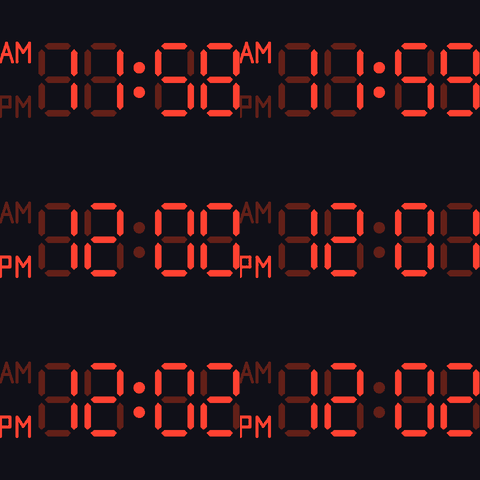
12h mode with the AM/PM column, rolling over noon —
example_digital_12h.yaml.
style: flipclock
flipclock:
  font: montserrat_48        # built-in LVGL font name, or an ESPHome font: id
  card_color: ...            # card fill - defaults to a dark grey
  flip_duration: 450ms       # one digit flip; 0 disables the animation
  blink: false               # divider dots blink off every other second
  blank_leading_zero: false  # hide the leading hour zero (blank card)
  show_dots: true            # false = no divider dots, just a gap between groups
  am_pm_font: montserrat_14  # 12h mode only - small AM/PM marker font
Examples: example_flipclock.yaml,
example_flipclock_12h.yaml.
Split-flap (“Solari”) cards, one digit per card, with a horizontal seam and
an animated flip on every digit change — the flipclock.js
look. Unlike digital this renders real font glyphs, so a font: is
required.
fonttakes either a built-in LVGL font (montserrat_8…montserrat_48— the validator enables it in the LVGL build automatically) or the id of an ESPHomefont:component, for any size or typeface. The glyph size is fixed by the font, so match it to the widget: the cards themselves scale towidth/height, the digits don’t. Built-in fonts stop atmontserrat_48— for bigger, crisp digits use an ESPHomefont:(a TTF at anysize:, e.g.120). Two gotchas: give it an id that is not a built-in font name (a colliding id likemontserrat_48is matched as the built-in and your component ignored), and setsize:explicitly (ESPHome fonts default to 20). Scaling a built-in bitmap font up instead would just look blocky.- Digit colour is the shared
foreground; the gaps between cards and the seam line showbackground. - The flip is the classic two-phase flap: the top half falls over the old digit, then lands on the bottom half revealing the new one, easing in like a real gravity-driven flap.
- In 12h mode (
twenty_four_hour: false) a dedicated AM/PM card is added in front of the hours, like on a real flip clock, with the marker sitting centred in the lower half of the card —am_pm_fontsizes its two-letter text (any built-in LVGL font or ESPHomefont:id; defaults to a small one).
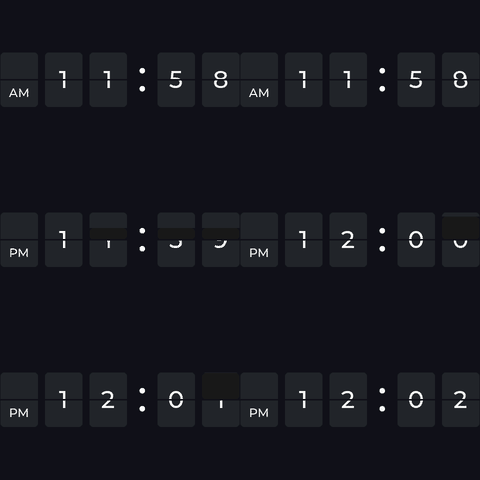
12h mode with the dedicated AM/PM card, flipping over noon —
example_flipclock_12h.yaml.
style: seg_matrix
seg_matrix:
  segment_style: classic     # classic | rounded - shape of each small segment
  off_color: ...             # colour of the unlit ghost grid (default dark)
Example: example_seg_matrix.yaml.
Big HH:MM digits drawn on a fixed 6×24 grid of small 7-segment displays,
using the hand-crafted segment font from the
7-segment display array clock
(ported verbatim) — each small display shows the exact segment pattern that
builds up the large numerals, with the rest of the grid as an unlit ghost.
foreground is the lit colour and off_color the ghost grid. The grid and
font are fixed at the reference 6×24 (so it’s a wide layout, ~4:1) —
each small display keeps its 7-segment aspect ratio and is centred in its cell,
so on a squarer display they just get larger and more spaced out.
Examples and hardware
The configs linked from each style above live in examples/ —
one ready-to-flash file per style. Each is deliberately tiny (just its
esphome: name: plus the lvgl: widgets: - lvgl_clock: ... block for that
style) because the board and the panel come in via packages: + !include
from two shared files — pick one of each:
packages:
  base: !include common_base_esp32_s3_devkit.yaml            # <- the board
  display: !include common_tft_4_0_spi_st7796_320_480.yaml   # <- the panel
The hardware below is only what these packages were tested on — not a compatibility list.
lvgl_clockis a plain LVGL widget drawing into its own canvas, so it runs on any ESP32 variant and any display ESPHome’s LVGL component can drive — SPI, parallel/RGB, big or small. The packages just save you writing the boilerplate for the combinations that were on the bench.
Boards
Tested on the two below; any ESPHome-supported ESP32 works. The one thing
that matters is RAM: the clock’s canvas is width × height × 2 bytes, so a
480×320 face alone is ~300 KB — more than a plain ESP32’s internal RAM, and
LVGL still needs its own buffers on top. Hence the recommendation of an
ESP32-S3 with PSRAM for larger panels; a classic ESP32 without PSRAM is
fine for the small ones.
| Board | Base package | Notes | |
|---|---|---|---|
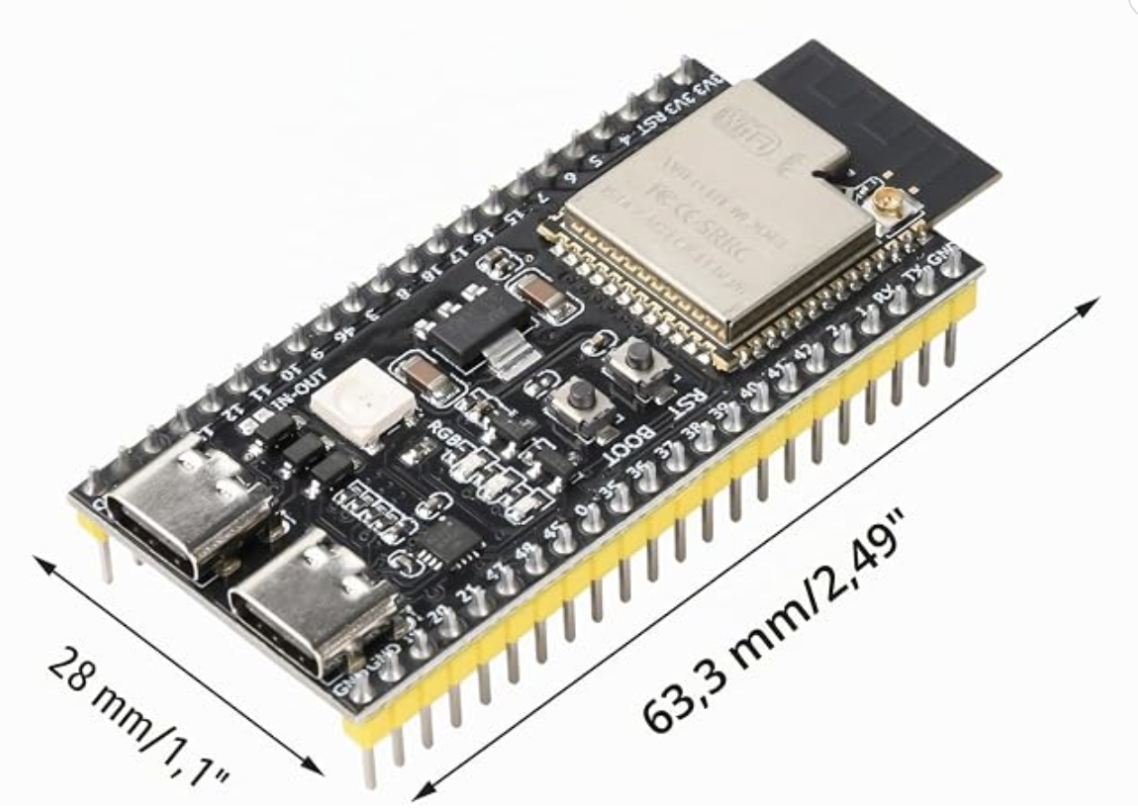 |
ESP32-S3-DevKitC-1 (N16R8) — buy | common_base_esp32_s3_devkit.yaml |
16 MB flash, 8 MB octal PSRAM, every GPIO on a header. What all the examples ship with, and the easiest to wire up. |
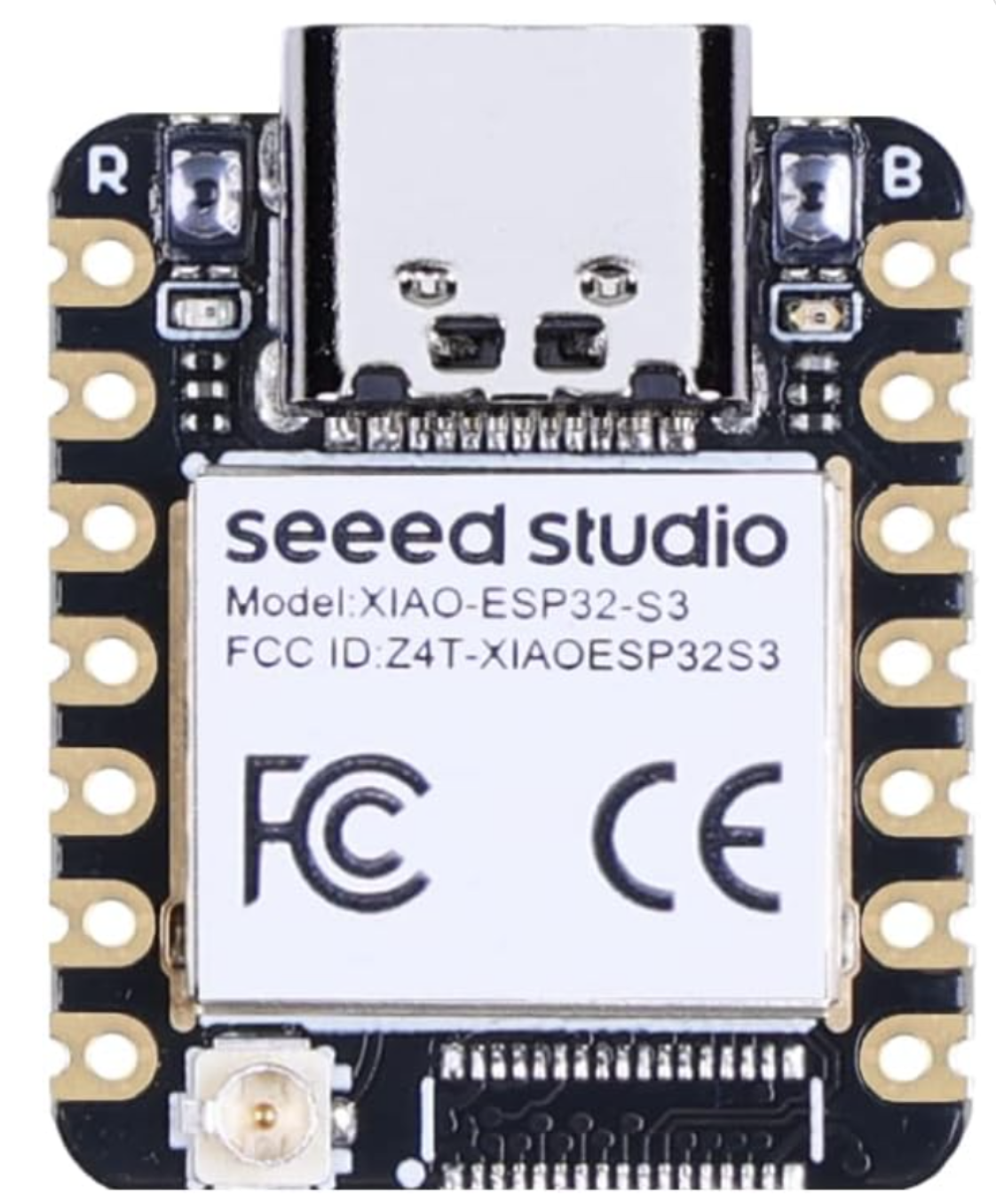 |
Seeed Studio XIAO ESP32-S3 — buy | common_base_esp32_s3_xiao.yaml |
Thumbnail-sized (21×17.5 mm) with the same 8 MB PSRAM — the one to use when the clock has to disappear into an enclosure. Fewer pins, so the package uses the XIAO’s SPI header: D8/D10/D9 for CLK/MOSI/MISO, D1/D2/D3 for CS/DC/RESET. |
The two packages are identical apart from the board: and the pin
substitutions, so switching is a one-line change to base:. Porting to a
third board is the same edit — copy one, change the board: and the six pin
substitutions.
Display panels
Again, three tested panels, not a limit — anything LVGL can drive will do.
These happen to be mipi_spi modules on the same four-wire bus, named
common_tft_<size>_<bus>_<chip>_<native resolution>.yaml, each shipping its
own size substitutions:
| Panel | Package | Landscape size | Notes | |
|---|---|---|---|---|
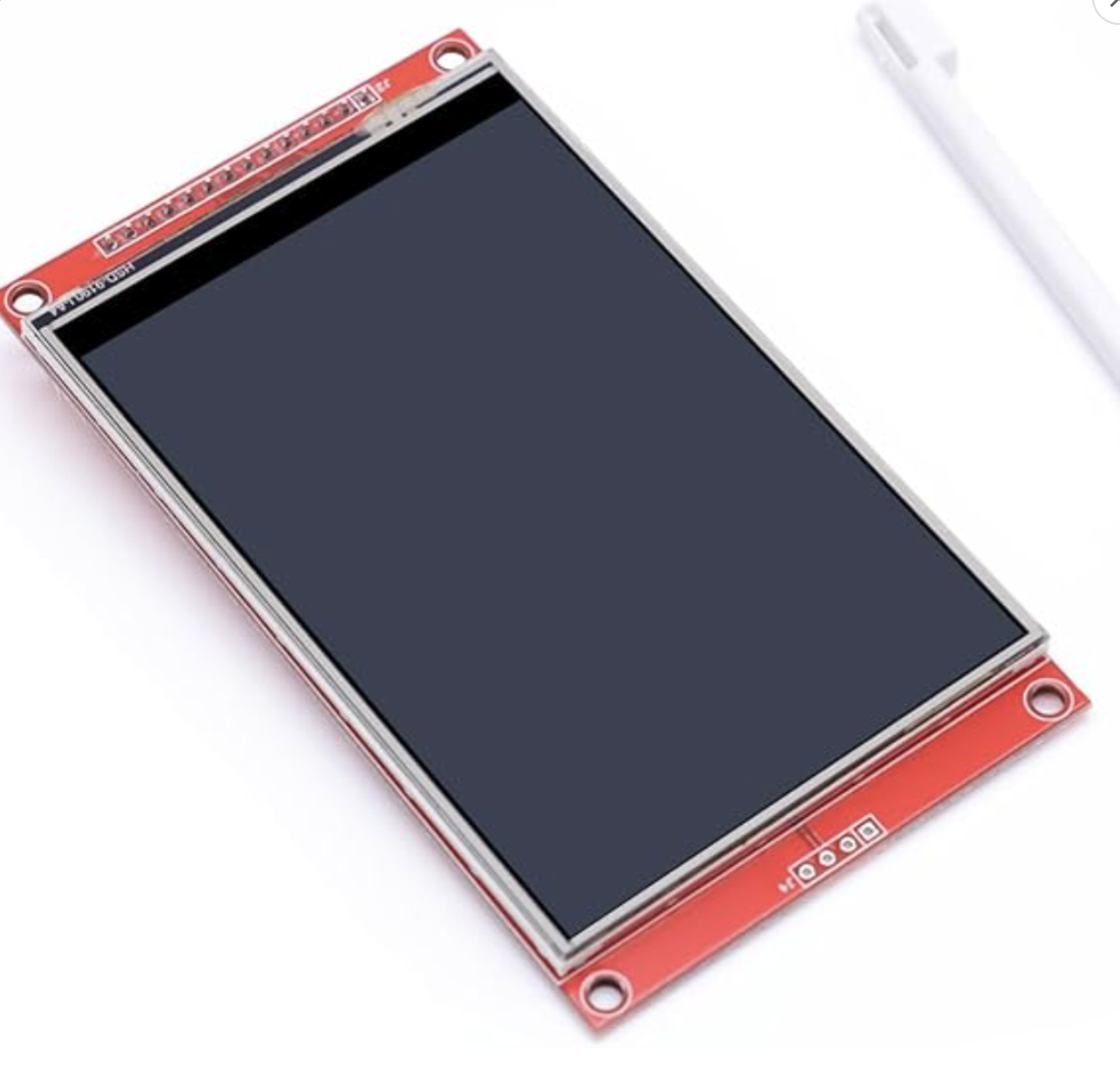 |
4.0” ST7796, 320×480 — buy | common_tft_4_0_spi_st7796_320_480.yaml |
480×320 | The big one — the only panel with room for seg_matrix and for flipclock at a 100 px font. 80 MHz data_rate, draw_rounding: 4. What every example ships with. |
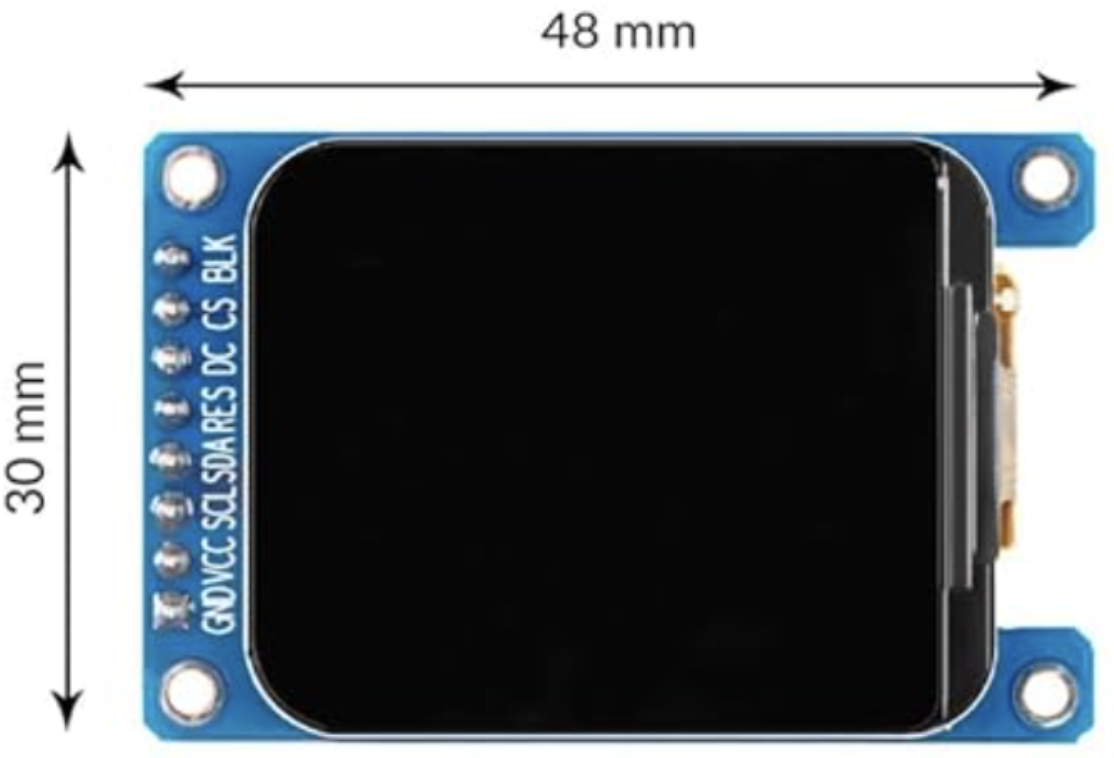 |
1.69” ST7789V2, 240×280 — buy | common_tft_1_69_spi_st7789v2_240_280.yaml |
280×240 | Rounded-corner IPS module, 48×30 mm — a nice desk clock. No MISO; needs invert_colors: true and offset_height: 20 (the glass sits 20 px down in the controller’s 240×320 frame buffer), both already in the package. |
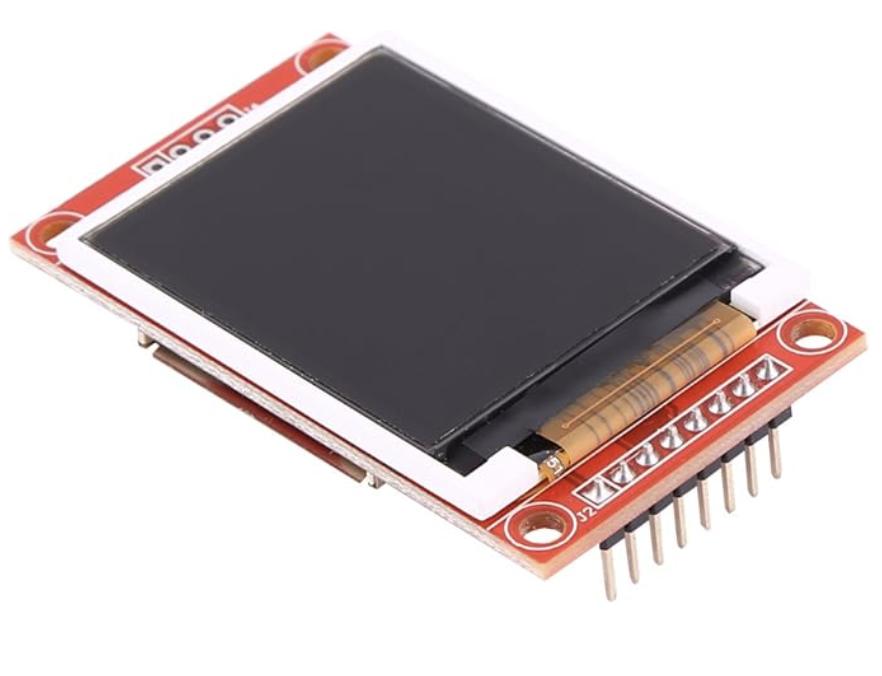 |
1.8” ST7735, 128×160 — buy | common_tft_1_8_spi_st7735_128_160.yaml |
160×128 | The cheap classic. No MISO line. Fine for analog, digital and clockclock24; too small for seg_matrix. |
| 1.28” round GC9A01A, 240×240 — Seeed Round Display for XIAO | common_tft_1_28_round_xiao_seeed_GC9A01A_240_240.yaml |
240×240 | A 39 mm disc that plugs onto a XIAO — round glass, so analog and clockclock24 suit it and seg_matrix does not. The package also wires the shield’s CHSC6X touch, its backlight as a dimmable light:, and its PCF8563 RTC (see below). XIAO-only: pins are fixed by the shield. The switch on the shield has to be on — it gates the backlight and the I²C bus, so with it off you get a black panel plus an 11 s Setup i2c stall and a failed RTC, none of which YAML can fix. |
Keeping time without a network: the round display carries a PCF8563 RTC on
the same I²C bus as its touch panel, and its package sets it up — the RTC reads
into the system clock every hour and gets a fresh SNTP time written back once a
day, so the clock is right immediately after a reboot with no Wi-Fi. Any
time: platform works the same way; the
widget just reads the system clock through its time_id.
Each file is a plain ESPHome
display: config, so adding your own
panel means copying whichever ESPHome config it already ships with and keeping
three things: id: my_display, the lvgl: binding, and the two size
substitutions. Nothing in the widget cares which controller is underneath — it
scales to whatever canvas you give it, though it can’t be larger than the
screen; see Resolution for the practical minimum per style. The
canvas is allocated as RGB565 (or ARGB8888 when transparent:), so a colour
LVGL build is assumed; monochrome and e-paper panels are untested, and a slow
panel wants a much slower render_interval: than the 16 ms default either way.
What each package provides
| File | What it provides |
|---|---|
a base (common_base_*.yaml) |
Everything that isn’t the panel: the board and framework, psram:, wifi: / api: / ota: / logger:, the external_components: pointer at ../components, the time: sntp source (id: clock_time), the bare lvgl_clock: marker key, the shared color: palette — cc_hands (white ink), cc_bg (black), cc_faces (the dark “ghost”/face grey) — and the pin substitutions. |
a display (common_tft_*.yaml) |
The spi: bus, the display: component (always id: my_display), the lvgl: binding for it (displays:, rotation: 90, black bg_color) and the size substitutions. Pins come from the base, so a panel file has no hard-coded GPIOs. |
packages: merges dicts key-by-key, so the display file’s lvgl: keys and the
example’s own lvgl: widgets: key combine into a single lvgl: block — which
is why swapping hardware is a one-line edit.
Substitutions
The pins and the clock size are each declared once and read everywhere else, so nothing is duplicated between the panel and the widget:
| Substitution | Declared in | Default | Used by |
|---|---|---|---|
clk_pin / mosi_pin / miso_pin |
the base | GPIO18 / GPIO13 / GPIO12 |
the display file’s spi: bus |
reset_pin / cs_pin / dc_pin |
the base | GPIO04 / GPIO16 / GPIO17 |
the display file’s display: |
clock_width / clock_height |
the display file | that panel’s landscape size | the lvgl_clock widget’s width: / height: |
touch_sda_pin / touch_scl_pin / touch_irq_pin / backlight_pin |
the round display file | D4 / D5 / D7 / D6 |
that panel’s extras — the pins the base doesn’t know about |
clock_width/clock_height live in the display file, so they always describe
the panel you actually included — swapping the display: line resizes the
clock with it, no second edit. The square-faced analog examples deliberately
use ${clock_height} for both sides, so the dial stays round on a landscape
panel.
Override any substitution with a top-level substitutions: block in the
example (the outer file wins over a package’s), e.g. to rewire the bus:
substitutions:
  mosi_pin: "GPIO11"
  clk_pin: "GPIO12"
The examples
All of them ship on the 4.0” ST7796, i.e. a 480×320 canvas. “Widget size” is
the width/height on the lvgl_clock widget itself:
| Example | Style | Widget size | What it shows |
|---|---|---|---|
example_clockclock24.yaml |
clockclock24 | full screen | The full boot sequence: rotate_left while Wi-Fi connects, flying_birds while waiting for NTP, then the time — driven from an interval: with the mode actions. |
example_clockclock24_demo.yaml |
clockclock24 | full screen | Boots straight into mode: demo so the digit-flip animation repeats every 5 s instead of once a minute. Handy for trying out the movement: options. |
example_analog.yaml |
analog | square (320×320) | Every analog option at once, plus transparent: true with a plain LVGL label: behind the face showing the date through the gaps. |
example_analog_sbb.yaml |
analog | square (320×320) | The Mondaine/SBB Swiss railway look: black-on-white, sbb hands, lollipop second hand. |
example_digital.yaml |
digital | full screen | 24 h HH:MM 7-segment with a blinking colon and the ghost 8. |
example_digital_12h.yaml |
digital | full screen | Same in 12 h mode — adds the vector-drawn AM/PM marker column. |
example_flipclock.yaml |
flipclock | full screen | Split-flap cards with a Google-font TTF (font: at size: 100) — the recommended way to get large crisp digits. |
example_flipclock_12h.yaml |
flipclock | full screen | Same in 12 h mode — adds the dedicated AM/PM flap card. |
example_seg_matrix.yaml |
seg_matrix | full screen | The 6×24 grid of small 7-segment displays with a dark red ghost grid. |
Multi-board builds
Two folders build a ClockClock 24 out of several boards rather than one screen.
Both drive several panels from a single MCU and share one clock over the UART
time platform, so they are also the worked examples of partial:,
lvgl_clock_id: as a list, cycle_modes: and sync_dot:.
| Build | Boards | What it is |
|---|---|---|
digital_clock_clock_24_24_round_screens/ |
8 × XIAO ESP32-S3, 3 round panels each | The full 24-clock wall — one board per physical column, built and running (photos). Master/slave roles, per-board configs board_a.yaml…board_h.yaml, wiring, pin budget, power and bring-up order in its own README. |
digital_clock_clock_24_4_screens/ |
2 × XIAO ESP32-S3, 2 panels each | The cheap way in — a sixth of the displays. Each panel renders a whole digit (partial: {mode: digit}) rather than one mini-clock, so four screens make HH:MM. The trade is a visible gap at every digit boundary, where the original is one continuous 8×3 grid. |
The examples read Wi-Fi/API/OTA credentials from secrets.yaml — copy
secrets.yaml.example to
examples/secrets.yaml and fill it in. Then:
esphome compile examples/example_clockclock24.yaml
esphome run     examples/example_clockclock24.yaml
Motion patterns
mode: pattern draws a pattern: 24 per-clock poses and speeds, authored in
tools/clockclock24-sim and exported as JSON.
No C++, no reflash of the slaves.
Point the master’s time platform at a folder:
time:
  - platform: lvgl_clock
    id: sync_out
    uart_id: sync_bus
    lvgl_clock_id: [dc_a, dc_b, dc_c]
    broadcast_interval: 1s
    patterns: patterns        # a folder of exported .json, next to the YAML
    pattern_delay: 30s        # first push, after the slaves have booted
    pattern_repeat: 5min      # and again, for boards that reboot later
Up to 8 patterns per node, named after their files — and those names are
usable directly in a cycle list, so wind,fan,love,shear plays two of your own
patterns by name.
Author them in the browser: tools/clockclock24-sim
runs this same engine, so a pattern looks on the wall exactly as it did on
screen. Pick Motion Pattern Editor Mode, pose the hands, set a direction and
speed per hand, Export, and drop the JSON in the folder.
How they get to the slaves
They are baked into the master’s firmware at codegen and pushed over the sync bus — so adding a pattern is one file plus a reflash of the master. The slaves need no filesystem, no upload step and no reflash at all.
pattern_delay |
30 s by default, and the number that matters. The master is the only board with Wi-Fi, so it is up and talking while the slaves are still bringing up PSRAM, three SPI panels and LVGL. A pattern pushed into that window is simply not heard — and unlike the time, which repeats every second, a missed pattern stays missed |
pattern_repeat |
5 min. A board rebooted, or plugged in, after the wall was already running picks the patterns up on its own |
Only the master is ever reflashed. It is the one board with wifi: and
ota:, so esphome run sends a new set over the network — no USB, no opening
the frame — and thirty seconds later every listener has them. The slaves carry
no network stack precisely so they never need one, and patterns are the thing
you actually iterate on: the mode you would otherwise be reflashing eight boards
to try.
Two extra line types share the bus, one per clock rather than one per pattern:
CCPN <slot> <name>
CCPC <slot> <clock> <h0> <h1> <dir0> <dir1> <v0> <v1>     ×24
Per clock keeps every line inside the same small RX buffer the time uses, and
means a lost byte costs one clock rather than a whole pattern — the next repeat
quietly repairs it. The master dribbles two lines per loop(), so a 25-line
pattern is out in well under a second while never holding the bus long enough to
delay a time packet.
A pattern is only drawn once all 24 clocks have arrived; until then that slot falls back to showing the time, which is honest rather than blank.
Editing them from Home Assistant
The folder is the starting point, not the authority. With api: on, the
master can expose the patterns and the rotation as entities and both become
editable while it runs — no reflash at all, not even of the master.
| Entity | |
|---|---|
Pattern 1…8 |
text, read and write. Its state is the pattern that is loaded, so copying the string copies the pattern — between slots, or between walls |
Mode |
select. The mode the wall is in, and a way to change it immediately. An override: a scheduled window will still take it back |
Pattern |
select, 1–8. Which pattern mode: pattern draws. Separate from Mode so switching between your own patterns is not also a mode change |
Cycle modes |
text. birds,temp,wave,fan,shear — modes and pattern names, in order. Repeats are meaningful, so listing temp every other entry gives it half the slots |
Cycle interval |
select, off or 1…60 min. off stops the rotation, leaving Mode in charge. The 35 s window itself is fixed; only the cadence is yours |
Movement |
select. opposite / clockwise / counter / long — how the two hands travel to a new digit |
Transition length |
number, seconds. The sweep time, and the fade into a mode |
Mode speed |
number, ×1 is the base. See below — this one is not a plain multiplier |
Hand colour · Background colour |
text, #rrggbb. Runtime, and on the wire — so a sunset automation warms the whole wall at once |
Reload patterns from firmware |
button. Throws away runtime edits and restores the folder — the way out of a bad one |
Reset look to firmware |
button. The same, for the saved look: movement, sweep length, speed, colours, cycle list and interval |
All of them are broadcast, so a change on the master reaches every listener
on the next packet. That is not a convenience: mode_speed scales the
animation’s time base, so two boards on different values drift apart rather
than merely look different. Sending them from one place is what makes that
impossible to get wrong.
All of it is saved to flash, ten seconds after the last change — long
enough that dragging a colour picker is one write, not fifty. So flash wins
over the compiled-in config at boot, and Reset look to firmware exists for
the same reason its pattern counterpart does. The mode is not saved: a wall
should come back telling the time.
Changing the speed is the interesting one. A choreography is evaluated at
t × mode_speed, so a new multiplier moves where the animation is, not only
how fast it runs from there. set_mode_speed() blends into the new position
instead of snapping — the same thing entering a mode does — and every board
applies the same number from the same packet, so the wall eases across together
and the phase lock survives the change.
These are stock template entities in the master’s YAML rather than a custom
platform, so they can be renamed, dropped or added to without touching this
component. See
board_d.yaml.
Three things make this work:
- A pattern fits a text entity, because it is packed. JSON is ~5 kB and a
Home Assistant text entity holds 255 characters. Packed it is five bytes per
clock — angle in 1.5° steps, direction in two bits, speed as a percent — so
120 bytes, 164 characters of base64 including the name. The 1.5° step is
ten times finer than the editor’s 15° snap, so nothing you can author is
lost.
tools/clockclock24-simemits exactly this string from Copy for ESPHome. - Edits are saved to flash. The wall keeps its patterns with Home Assistant switched off, which matters more here than usual: the whole design rests on the seven slaves needing nothing but power and a wire, and a master that came up blank after a reboot would quietly undo that. Written only on change, so NVS is not worn out by republishing.
- Only the master is involved. The cycle list and interval are read by the
picker, which is the master, so they never go on the wire and no slave needs
anything. A pattern write re-pushes immediately rather than waiting out
pattern_repeat— an edit you cannot see for five minutes is an edit you will assume failed.
What is not on the wire
The editor lets a speed be written as “the same as my neighbour, ±” so a gradient can be authored by setting one clock. That is resolved at codegen, in Python — chains followed, cycles broken, everything clamped — and the firmware only ever sees plain numbers. Walking a graph and breaking its cycles is not work worth shipping to eight microcontrollers.
Why a pattern cannot break the wall
Every hand is pose + dir × speed × rate × t. That is continuous for any
data whatsoever, so a pattern cannot make a hand jump however badly it was
authored — which is what makes it safe to take this mode’s input from a text
file at all.
Resolution
Auto-scales to the draw area; the first render logs the actual size vs the recommended minimum, per style:
| Style | Practical minimum |
|---|---|
| clockclock24 | ~128×48 at the default spacing (a 128×64 OLED is the sweet spot) |
| analog | ~24×24 (bigger = more detail) |
| digital | ~24×12 (the 7-segment renderer is self-contained - no font, scales freely) |
| flipclock | font-dependent - the cards scale, the glyphs don’t; pick a font that fits |
| seg_matrix | fixed 6×24 grid, ~144×60 px min; wants a wide (~4:1) panel |
PSRAM (large displays)
The widget’s canvas buffer is width × height × 2 bytes (×4 with
transparent:). A full-colour display like 480×320 needs ~300 KB, which won’t
fit in an ESP32-S3’s internal RAM — enable PSRAM so LVGL has room:
# enable PSRAM for the ESP32-S3 - required for LVGL at 480x320
psram:
  mode: octal      # check your board's PSRAM mode; octal is the ESP32-S3 default
  speed: 80MHz

display:
  - platform: mipi_spi
    id: my_display
    model: "ST7796"
    data_rate: 80MHz   # to ensure framerate
Without enough free RAM the canvas allocation fails; the widget logs an error and disables itself (blank clock) rather than crashing.
Credits
ClockClock 24 by Humans since 1982;
JS reference by Manuel Wieser.
Analog face after the SBB Swiss railway clock (Hans Hilfiker, 1944).
seg_matrix after the 7-segment display array clock.